高通QSDK 设置默认参数
如何设置默认的时区和时间同步
修改package/base-files/files/etc/config/system文件内容如下
config system
	option hostname 'OpenWrt'
    option log_size '64'
    option zonename 'Asia/Shanghai'
    option timezone 'CST-8'
	option log_size	64

config timeserver ntp
	list server	0.openwrt.pool.ntp.org
	list server	1.openwrt.pool.ntp.org
	list server	2.openwrt.pool.ntp.org
	list server	3.openwrt.pool.ntp.org
	option enabled 1
	option enable_server 0
如何设置默认的无线参数
修改qca/feeds/qca/net/qca-wifi/files/qcawificfg80211.sh文件内容如下
cat <<EOF
config wifi-device  wifi$devidx
	option type	qcawificfg80211
	option channel	auto
	option macaddr	$(cat /sys/class/net/${dev}/address)
	option hwmode	11${mode_11}
	# REMOVE THIS LINE TO ENABLE WIFI:
	option disabled 0

config wifi-iface
	option device	wifi$devidx #这里命名加了索引号
	option network	lan
	option mode	ap
	option ssid	wim_$(cat /sys/class/net/${dev}/address)_$devidx #这里的ssid加了mac地址和索引号
	option encryption none

EOF
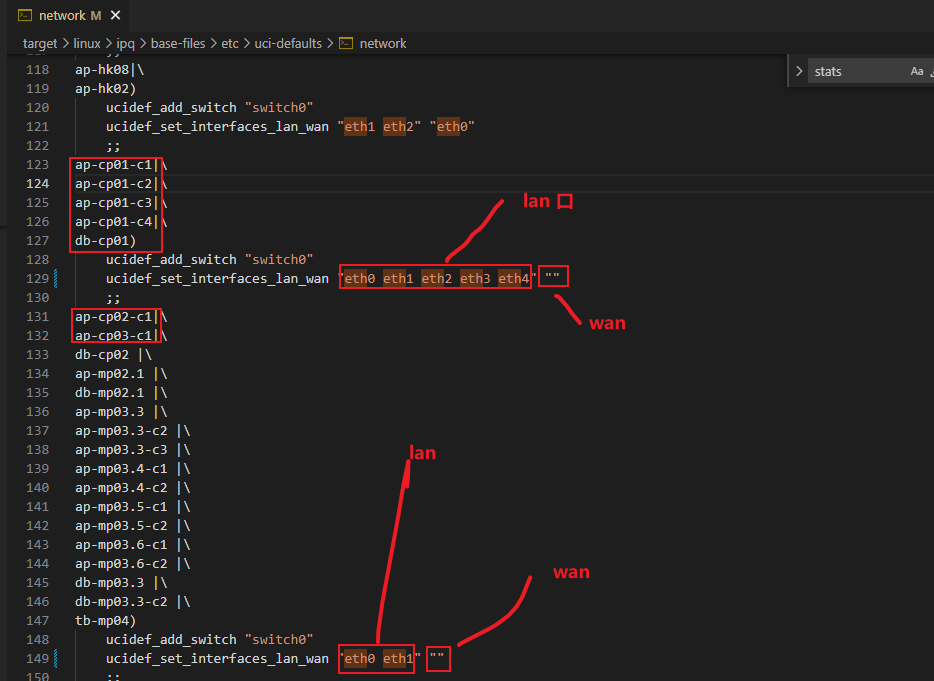
如何修改默认有线网卡br-lan和wan口
理论上修改package/base-files/files/etc/config/network文件即可,但是被某些脚本给覆盖了,脚本如下:
修改target/linux/ipq/base-files/etc/uci-defaults/network文件
如何修改有线网卡的默认mac地址
理论上修改package/base-files/files/etc/config/network文件:新增option macaddr
config interface 'loopback'
        option ifname 'lo'
        option proto 'static'
        option ipaddr '127.0.0.1'
        option netmask '255.0.0.0'

config globals 'globals'
        option ula_prefix 'auto'

config switch
        option name 'switch0'

config interface 'lan'
        option ifname 'eth0 eth1 eth2 eth3 eth4'
        option force_link '1'
        option type 'bridge'
        option proto 'static'
        option ipaddr '192.168.50.1'
        option netmask '255.255.255.0'
        option ip6assign '60'
        option multicast_querier '0'
        option igmp_snooping '0'
        option ieee1905managed '1'
        option macaddr "56:99:F6:D7:99:4C"   # 修改br-lan的mac地址

config interface 'wan'
        option proto 'dhcp'

config interface 'wan6'
        option proto 'dhcpv6'
如何查看板子类型
cat /tmp/sysinfo/board_name
如何查看系统的编译时间
cat /proc/version
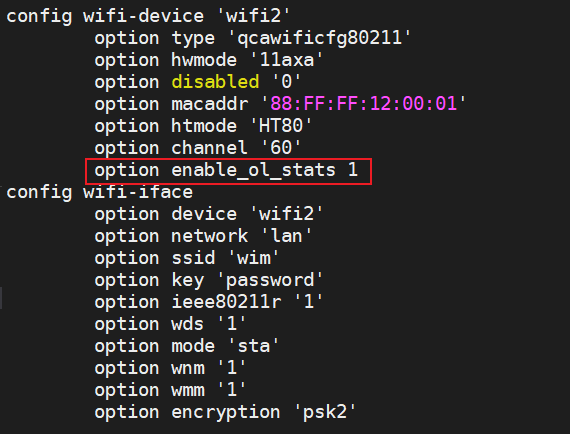
如何使能enable_ol_stats 1
如何修改系统的默认登录密码
修改配置文件为
package/network/services/dropbear/files/dropbear.config内容如下:config dropbear option PasswordAuth 'on' option RootPasswordAuth 'on' option Port '22' # option BannerFile '/etc/banner'
用网页把密码改了,然后提交
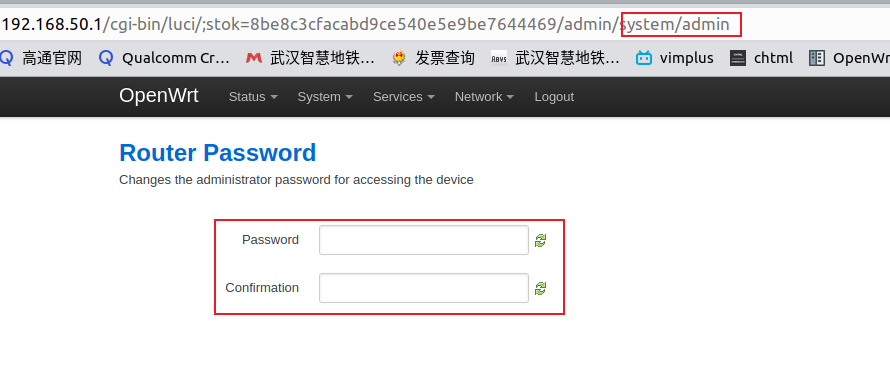
查看板子上的
/etc/shadow文件,复制root那一行的内容root:$1$dsPwbSvk$8Lw30jMnX8ClB6.H3Eh5j1:19535:0:99999:7::: # 复制該行内容 daemon:*:0:0:99999:7::: ftp:*:0:0:99999:7::: network:*:0:0:99999:7::: nobody:*:0:0:99999:7::: dnsmasq:x:0:0:99999:7::: lldp:x:0:0:99999:7:::
修改源码
package/base-files/files/etc/shadow文件中root那一行的内容,为第3步复制的内容即可黏贴前
root::0:0:99999:7:::
daemon:*:0:0:99999:7:::
ftp:*:0:0:99999:7:::
network:*:0:0:99999:7:::
nobody:*:0:0:99999:7:::
黏贴后
root:$1$dsPwbSvk$8Lw30jMnX8ClB6.H3Eh5j1:19535:0:99999:7:::
daemon:*:0:0:99999:7:::
ftp:*:0:0:99999:7:::
network:*:0:0:99999:7:::
nobody:*:0:0:99999:7:::
如何修改开机logo
修改文件package/base-files/files/etc/banner
     MM           NM                    MMMMMMM          M       M
   $MMMMM        MMMMM                MMMMMMMMMMM      MMM     MMM
  MMMMMMMM     MM MMMMM.              MMMMM:MMMMMM:   MMMM   MMMMM
MMMM= MMMMMM  MMM   MMMM       MMMMM   MMMM  MMMMMM   MMMM  MMMMM'
MMMM=  MMMMM MMMM    MM       MMMMM    MMMM    MMMM   MMMMNMMMMM
MMMM=   MMMM  MMMMM          MMMMM     MMMM    MMMM   MMMMMMMM
MMMM=   MMMM   MMMMMM       MMMMM      MMMM    MMMM   MMMMMMMMM
MMMM=   MMMM     MMMMM,    NMMMMMMMM   MMMM    MMMM   MMMMMMMMMMM
MMMM=   MMMM      MMMMMM   MMMMMMMM    MMMM    MMMM   MMMM  MMMMMM
MMMM=   MMMM   MM    MMMM    MMMM      MMMM    MMMM   MMMM    MMMM
MMMM$ ,MMMMM  MMMMM  MMMM    MMM       MMMM   MMMMM   MMMM    MMMM
  MMMMMMM:      MMMMMMM     M         MMMMMMMMMMMM  MMMMMMM MMMMMMM
    MMMMMM       MMMMN     M           MMMMMMMMM      MMMM    MMMM
     MMMM          M                    MMMMMMM        M       M
       M
---------------------------------------------------------------
  For those about to rock... (%C, %R)
---------------------------------------------------------------
如何修改主机名字
修改package/base-files/files/etc/config/system文件内容如下:
config system
	option hostname 'wim' 				# 修改主机名字地方
    option log_size '64'
    option zonename 'Asia/Shanghai'
    option timezone 'CST-8'
	option log_size	64

config timeserver ntp
	list server	0.openwrt.pool.ntp.org
	list server	1.openwrt.pool.ntp.org
	list server	2.openwrt.pool.ntp.org
	list server	3.openwrt.pool.ntp.org
	option enabled 1
	option enable_server 0