QSDK reset按键
内核配置
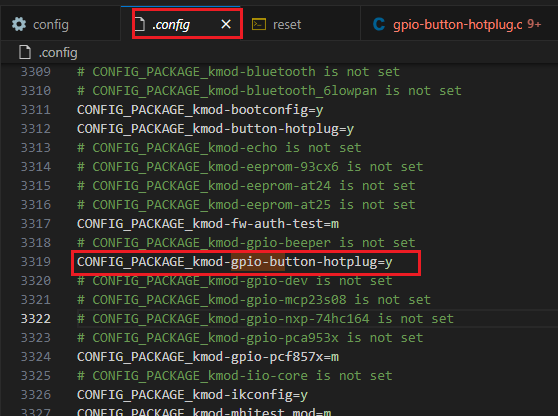
dts配置
以qcom-ipq6018-cp02-c1.dts为例说明
pinctrl配置
&tlnm{
	button_pins: button_pins {
		reset_button {
			pins = "gpio18";
			function = "gpio";
			drive-strength = <8>;
			bias-pull-down;
		};
	};
};
reset按键配置
&soc{
	gpio_keys {
		compatible = "gpio-keys";
		pinctrl-0 = <&button_pins>;
		pinctrl-names = "default";

		reset {
			label = "reset";
			linux,code = <KEY_POWER>;
			gpios = <&tlmm 18 GPIO_ACTIVE_LOW>;
			linux,input-type = <1>;
			debounce-interval = <60>;
		};
	};
};
从上面的信息可以看出io使用的是gpio18,驱动使用的是compatible = "gpio-keys";
平台驱动
static struct platform_driver gpio_keys_driver = {
	.probe	= gpio_keys_probe,
	.remove	= gpio_keys_remove,
	.driver	= {
		.name	= "gpio-keys",
		.owner	= THIS_MODULE,
		.of_match_table = of_match_ptr(gpio_keys_of_match),
	},
};
static int __init gpio_button_init(void)
{
	int ret;
	ret = platform_driver_register(&gpio_keys_driver);
	if (ret)
		return ret;

	return ret;
}
gpio_keys_probe
	gpio_keys_button_probe(pdev, &bdev, 0); // 启动工作队列和定时器
		INIT_WORK(&bdata->work_irq, gpio_keys_gpio_work_func);
		setup_timer(&bdata->timer, gpio_keys_gpio_timer,);
	devm_request_irq						// 申请中断
	button_hotplug_event					// 创建hotplug事件
gpio_keys_gpio_work_fun函数bdata->last_state = gpio_button_get_value(bdata); button_hotplug_event(bdata, bdata->b->type ?: EV_KEY, bdata->last_state);
gpio_keys_gpio_timer函数struct gpio_keys_button_data *bdata = (struct gpio_keys_button_data *)_data; schedule_work(&bdata->work_irq); //启动
button_hotplug_event函数button_hotplug_create_event(button_map[btn].name, type, (seen - priv->seen) / HZ, value);
button_hotplug_create_event函数static int button_hotplug_create_event(const char *name, unsigned int type, unsigned long seen, int pressed) { struct bh_event *event; BH_DBG("create event, name=%s, seen=%lu, pressed=%d\n", name, seen, pressed); event = kzalloc(sizeof(*event), GFP_KERNEL); if (!event) return -ENOMEM; event->name = name; event->type = type; event->seen = seen; event->action = pressed ? "pressed" : "released"; INIT_WORK(&event->work, (void *)(void *)button_hotplug_work); schedule_work(&event->work); return 0; }button_hotplug_work函数static void button_hotplug_work(struct work_struct *work) { struct bh_event *event = container_of(work, struct bh_event, work); int ret = 0; event->skb = alloc_skb(BH_SKB_SIZE, GFP_KERNEL); if (!event->skb) goto out_free_event; ret = bh_event_add_var(event, 0, "%s@", event->action); if (ret) goto out_free_skb; ret = button_hotplug_fill_event(event); if (ret) goto out_free_skb; NETLINK_CB(event->skb).dst_group = 1; broadcast_uevent(event->skb, 0, 1, GFP_KERNEL); //通过broadcast_uevent发到用户层。 out_free_skb: if (ret) { BH_ERR("work error %d\n", ret); kfree_skb(event->skb); } out_free_event: kfree(event); }
reset按键应用层处理
#!/bin/sh

[ "${ACTION}" = "released" ] || exit 0

. /lib/functions.sh

logger "$BUTTON pressed for $SEEN seconds"

if [ "$SEEN" -lt 1 ]
then
	echo "REBOOT" > /dev/console
	sync
	reboot
elif [ "$SEEN" -gt 5 ]
then
	echo "FACTORY RESET" > /dev/console
	jffs2reset -y && reboot &
fi

return 0